
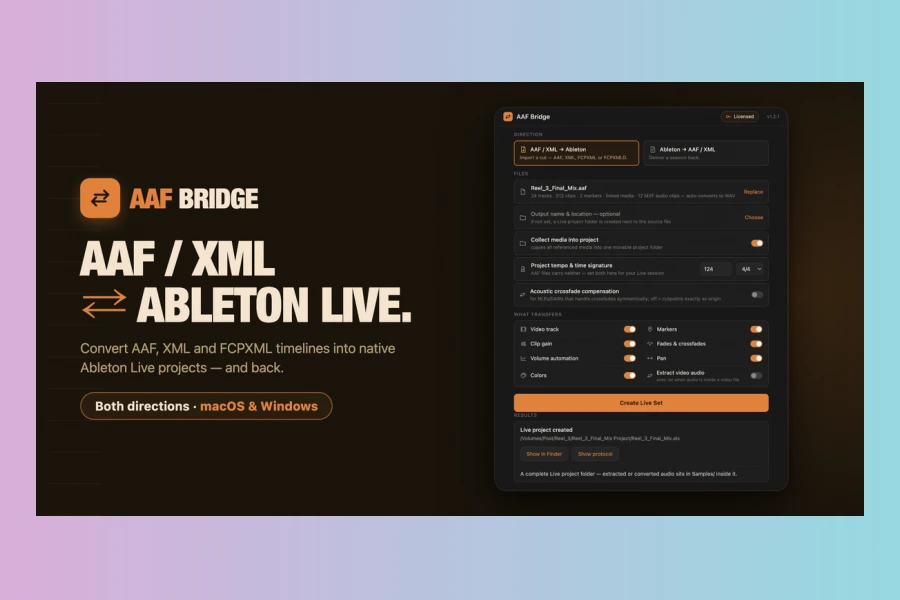
AAF Bridge: Two-Way AAF/XML to Ableton Live Converter
AAFTools has announced the release of AAF Bridge, a new software utility designed to streamline audio post-production workflows for electronic music producers. This innovative tool provides a comprehensive two-way conversion solution, enabling users to effortlessly transfer timelines between popular video editing platforms and Ableton Live. Essentially, it bridges the gap, allowing for seamless integration of Ableton Live’s powerful sound design and music production capabilities into film and video projects.
The software facilitates the import of AAF files from professional video editors such as DaVinci Resolve, Pro Tools, Media Composer, Premiere Pro, and Nuendo directly into Ableton Live projects. Conversely, it allows finished Ableton Live Sets to be exported back into various editor formats including AAF, Premiere XML, FCPXML, or FCPXMLD. This bidirectional functionality ensures that producers can take a locked cut, perform their specialized sound design or music composition in Ableton Live, and then deliver the session back to the editor with all critical elements intact.
Streamlining Post-Production Workflow
AAF Bridge addresses a critical need in audio post-production by offering a dependable way to move timelines in and out of Ableton Live. Historically, Ableton Live lacked native AAF import or export capabilities, making it challenging to integrate into professional film and video workflows. However, with AAF Bridge, Ableton Live now functions like any conform-ready DAW. Producers can import a cut, leverage Live’s unique warping, racks, and instruments for sound design or film scoring, and then export the session back to the editor.
A significant aspect of its design is the commitment to accuracy. All transfers are sample-accurate, meaning clip positions land precisely at any sample rate (44.1, 48, 96, or 192 kHz). This precision is crucial for maintaining sync between audio and video. Moreover, the tool handles a wide array of metadata, ensuring that the integrity of the original edit is preserved. The picture also rides along on its own video track during both import and export, facilitating mixing to image directly within Ableton Live, complete with markers, fades, and automation.
Key Features and Format Handling
AAF Bridge boasts a robust set of features designed to ensure a smooth transition between platforms. It pays particular attention to crossfades, mapping them to the target’s native construct, whether it’s Ableton’s own crossfade encoding on import or real AAF dissolves on export. This ensures full blend length with no audible level dips, and round trips are designed to restore the edit exactly. Furthermore, the software automatically converts MXF-wrapped audio, a common format from Resolve, to WAV during import, eliminating the need for manual transcoding.
While AAF is the preferred and richest format for exchange, AAF Bridge also supports Premiere XML and FCPXML/FCPXMLD for Final Cut Pro. The application provides clear indications of what transfers across different formats, with switches to control features like markers, fades, colors, automation, and video reference. It also generates a plain-text conversion report for every conversion, detailing what transferred, what needed attention, and any limitations encountered.
Features
- Sample-accurate clip positions & source offsets across various sample rates
- Native Ableton crossfades on import; real AAF/XML dissolves on export
- Transfers markers, clip gain, track/clip colors, pan, and volume automation
- Automatic conversion of MXF audio to WAV during import
- Includes video track for mixing to picture within Ableton Live
- Allows setting project tempo & time signature on import
- Supports AAF, Premiere XML, FCPXML, and FCPXMLD formats
- Exports either audible material or all tracks, including muted content
- Option to collect all referenced media into a self-contained project folder
- Generates a detailed plain-text conversion report for each session

Price
Regular: $49 (one-time payment)
AAF Bridge is available for macOS (13 or newer, Apple Silicon) and Windows (10/11), and it is compatible with Ableton Live 11 and 12. The developer offers a free demo version, which provides full functionality but limits the output to the first 120 seconds of the timeline, allowing users to test its compatibility with their specific workflows before purchase.
👍 Pros
- ✓ Two-way conversion between video editors and Ableton Live with sample accuracy
- ✓ Supports AAF, XML, and FCPXML formats for broad compatibility
- ✓ Transfers crucial elements like fades, automation, markers, and colors
- ✓ Automatic MXF audio to WAV conversion simplifies workflow
- ✓ Runs offline with no subscriptions, ensuring privacy and control
👎 Cons
- ✗ Does not transfer MIDI, plugin chains, or bus routing (AAF is audio-only)
- ✗ Time-stretched clips require manual consolidation in Ableton for accurate export
- ✗ XML formats have more limitations compared to AAF (e.g., pan/colors)
- ✗ Initial launch on macOS/Windows may require manual security bypass
- ✗ Specific system requirements (macOS 13+, Windows 10/11, Live 11/12)
More info: AAFTools | AAF Bridge