
SynthEdit 1.6 Beta Adds Native macOS Support
Jeff McClintock has announced the release of SynthEdit 1.6 Beta, marking a significant milestone for the long-standing modular development environment. Notably, this is the first version of SynthEdit to offer native support for macOS, including Apple Silicon, after more than three decades as a Windows-only application. This expansion greatly broadens its accessibility for electronic music producers and sound designers across different operating systems. The 1.6 beta track runs in parallel with the stable 1.5 release, allowing users to explore the new features while maintaining access to the established version.
A Modular Development Environment for Custom Plugins
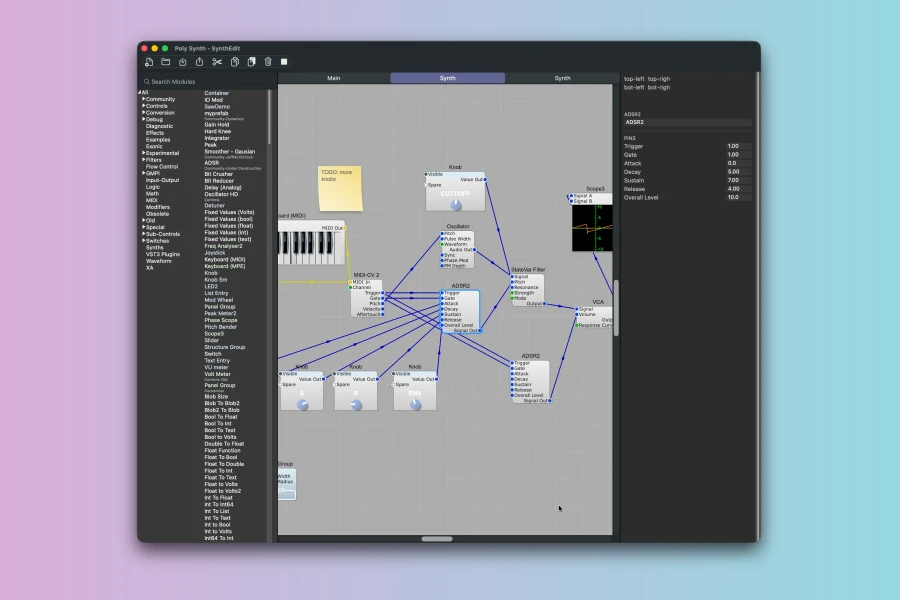
SynthEdit provides a powerful visual environment for designing custom synthesizers and effects. Users can patch various modules together on a virtual canvas, subsequently drawing a front panel for their creation. Furthermore, the completed project can be exported as a 64-bit VST3 or Audio Unit plugin, compatible with major DAWs on both Windows and macOS. The platform emphasizes transparency; every oscillator, filter, and arithmetic component is visible as a module, and all connections are user-drawn wires. This approach fosters a deep understanding of sound design principles. Moreover, the engine runs continuously during the design process, allowing for real-time auditory feedback as changes are made. Hovering over any pin or wire reveals a miniature live scope, displaying the signal flow.
Key Enhancements in Version 1.6
The 1.6 update introduces several crucial improvements beyond macOS compatibility. For instance, a New Wavetable Oscillator is included, featuring built-in test waveforms such as saw, sine, square, and noise, alongside anti-aliasing mip mapping. Similarly, Resizable Plugin Windows ensure that exported VST3 and AU plugins resize cleanly, with DPI-aware refresh capabilities. On the Windows platform, WASAPI driver support has been added, enhancing audio performance. Additionally, the improved Live Hoverscopes now extend to GUI and IO modules, offering more comprehensive signal monitoring. Project-specific skins are now supported, allowing for greater customization of plugin aesthetics.
Flexible Export and Ownership
A core philosophy of SynthEdit is user ownership. What you build is entirely yours to sell or give away, without any royalties or permission needed from SynthEdit. The plugins created are royalty-free and do not require internet registration or license servers for end-users. This ensures independence for developers. For those with C++ experience, SynthEdit offers a unique escape route: SE2JUCE can export a project as JUCE-compatible source code. While this requires genuine software development expertise, it means your work is not confined to SynthEdit’s proprietary file format. The software itself, however, activates online, with offline activation options available for disconnected workflows.
Known Limitations
Despite its extensive capabilities, SynthEdit does have some current limitations. MIDI processing can be somewhat awkward due to the VST3 format’s inherent constraints, which may affect MIDI effect-style plugins. Furthermore, exporting a standalone application is not yet supported; current export targets are limited to VST3 and Audio Unit formats. CLAP support is also not ready in this version. Additionally, the Linux port is currently an experimental x64 build, considered a rough prototype not yet suitable for reliable use. Users can download a fully featured 60-day demo, which includes plugin export functionality, to explore SynthEdit 1.6 Beta.
Features
- Native macOS support (Apple Silicon compatible)
- Exports 64-bit VST3 and Audio Unit plugins
- Modular visual patching environment
- Real-time DSP engine with live hoverscopes
- New Wavetable Oscillator with anti-aliasing
- Resizable plugin windows (VST3, AU)
- WASAPI driver support on Windows
- 300+ built-in modules and C++ SDK for custom DSP
- Drag-and-drop panel designer with custom graphics
- Royalty-free distribution of created plugins
- SE2JUCE export to JUCE-compatible C++ source
👍 Pros
- ✓ Native macOS support (including Apple Silicon) and VST3/AU export.
- ✓ Modular visual environment for designing custom synthesizers and effects.
- ✓ Royalty-free distribution of created plugins with no internet registration.
👎 Cons
- ✗ Limited MIDI processing capabilities and no standalone application export.
- ✗ Linux port is currently a rough prototype and not yet reliable.
More info: SynthEdit | SynthEdit 1.6 Beta