
RaiderPro V2: Enhanced Vocal Riding & Automation Plugin
Casa Occidente has recently announced the release of RaiderPro version 2.0.0, an update that brings significant enhancements to the plugin’s automation workflow. This latest iteration focuses on delivering more reliable Write/Read behavior and improved integration with digital audio workstations. The update aims to streamline the mixing process for producers, engineers, and content creators, making volume automation less time-consuming and more precise.
Enhanced Automation Reliability
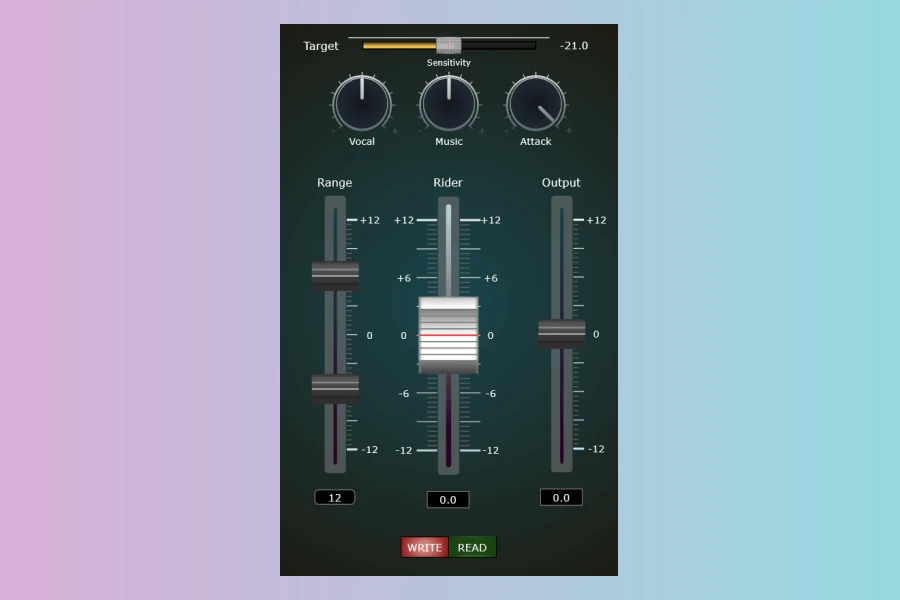
The core of the RaiderPro v2.0.0 update lies in its refined automation capabilities. Users will now experience more reliable Write and Read automation modes, which is crucial for consistent mixing results. Furthermore, the selected Write/Read mode is correctly restored upon reopening the plugin window, preventing unexpected changes in workflow. This consistency extends to mixing sessions where the plugin interface might be closed, ensuring automation behaves as expected throughout the project. Consequently, producers can maintain their creative flow without constantly monitoring plugin states.
Improved DAW Integration and Workflow
Casa Occidente has also focused on bolstering RaiderPro’s communication with supported DAWs. Specifically, improved integration with Reaper and Ableton Live promises a smoother automation workflow. For instance, the company has addressed certain operational nuances within Ableton Live. If recorded automation appears grey and playback does not follow it, users are advised to simply click ‘Re-enable Automation.’ This action, as Casa Occidente clarifies, addresses a DAW-specific state rather than a plugin issue. To further assist users, a new tutorial has been published, demonstrating the updated automation workflow in Ableton Live. This guide covers essential steps such as writing Rider Fader automation, transferring it to Track Volume, and subsequently removing the plugin to reduce CPU usage while preserving all automation data.
What is RaiderPro?
RaiderPro functions as an automatic vocal rider, audio leveler, and sidechain processor, all within a single streamlined plugin. It is designed to eliminate the hours often spent manually drawing volume automation curves to correct inconsistent levels in a mix. Powered by intelligent Rider technology, the plugin continuously adjusts levels in real-time as audio changes. This ensures tracks remain balanced, present, and easier to mix, whether dealing with vocals, instruments, podcasts, or voiceovers. Moreover, its vocal-aware dynamics control, termed ‘Vocal Sensitivity,’ enhances response to vocal performances, thereby improving clarity and intelligibility.
Versatile Dynamics Control
Beyond automatic leveling, RaiderPro offers musical sidechain processing. This feature enables users to create clean ducking effects, improve instrument separation, and carve out space within a mix. The plugin also provides transparent peak control, which helps in managing transients and increasing perceived loudness without compromising the natural character or dynamics of the audio. Ultimately, RaiderPro aims to empower producers to achieve cleaner, more consistent mixes with less effort, allowing them to focus more on creative decisions rather than repetitive editing tasks.Features
- Automatic Volume Riding for vocals, instruments, and podcasts
- Vocal-Aware Dynamics Control (Vocal Sensitivity)
- Musical Sidechain Processing for ducking and separation
- Faster Automation Workflow with real-time adjustments
- Transparent Peak Control to maintain dynamics
- Print Automation & Save CPU by baking automation into tracks
- Low CPU Usage
- No iLok Required
- No Subscription
- Fast Setup & Workflow

Price
Sale: 34.99 USD
Regular: 199.00 USD
👍 Pros
- ✓ Automates volume riding for vocals, instruments, and podcasts
- ✓ Features vocal-aware dynamics for clarity and intelligibility
- ✓ Streamlines workflow by reducing manual automation time
👎 Cons
- ✗ Requires manual re-enable automation in Ableton Live in specific scenarios
- ✗ Specialized function, might not offer broader dynamics processing beyond riding/leveling
More info: Casa Occidente | RaiderPro