

Ableton Live 12 MIDI Tools: Datafree Turns Data Into Music
Ableton Live 12 opened a powerful new creative door when it shipped — and most producers walked right past it. The Clips window now hosts MIDI Generative Tools and MIDI Transformation Tools, letting you generate and reshape musical ideas without ever leaving the arrangement. But outside of a handful of developers, almost nobody is exploring what this system can actually do. One free plugin is about to change that.
What Are MIDI Tools in Ableton Live 12?
When you open a MIDI Clip in Live 12, you’ll notice a small icon on the right-hand side of the Clip View. That’s the entry point to Live’s new MIDI Tools system — a framework that lets you generate new musical material or transform existing patterns directly inside the Clips window.
There are two categories:
- MIDI Generative Tools: Create new note patterns from scratch using algorithms, randomization, or — as we’ll see — raw numerical data.
- MIDI Transformation Tools: Modify existing MIDI clips with operations like humanization, velocity shaping, rhythmic displacement, and more.
The system is built on Max for Live, meaning third-party developers can create their own MIDI Tools. In theory, this should have sparked an explosion of creative devices. In practice, only a few developers have taken the opportunity seriously.
Manifest Audio: The Developer Actually Building for This
Noah Pred, the producer and developer behind Manifest Audio, has produced more third-party MIDI Tools than anyone else in the Live ecosystem. His catalog includes Generator bundles, Transformation bundles, and a growing suite of Sonification Tools — all designed to work inside Live 12’s Clips window.
The standout free entry point is Datafree.
Datafree: Turn Any Numbers Into Music
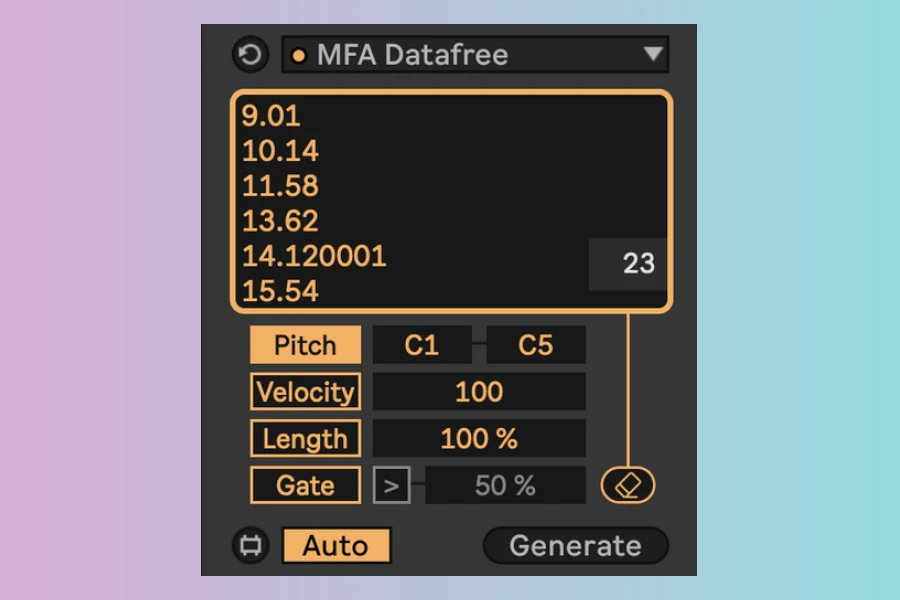
Datafree is a free Max for Live MIDI Tool Generator that converts numerical data into MIDI note patterns. Paste in any dataset — climate temperatures, stock prices, sports statistics, sensor readings — and Datafree maps those values to pitch, velocity, and note length within your clip’s current grid rate, key, and scale.
Key features:
- Maps data values to pitch across a scale-aware range
- Velocity mapping reflects data magnitude in note dynamics
- Length mapping translates data values into note duration
- Generated notes conform to the clip’s current Scale and Key settings
- Note timing follows the clip’s active Grid resolution
- Gate function to suppress notes above or below a threshold, creating rhythmic variations
Datafree accepts up to 256 data points. It’s free to download, or pay-what-you-can — proceeds go to World Central Kitchen.
Quick Start: Weather Data Walkthrough
The most accessible data source is weather. Open-Meteo provides free, open-source meteorological data — 90 terabytes of it — with a web UI that requires no coding.
- Go to Open-Meteo’s Historical Weather API
- Select your location and a weather variable (temperature works great)
- Download the CSV data
- Open the CSV in any spreadsheet app and copy up to 256 rows of numbers
- In Live 12, create a new MIDI Clip, open the Generative Tools panel, and select Datafree
- Paste your numbers, choose a pitch range, click Generate
You’ll see the temperature curve visualized as notes in your clip. The pattern literally looks like the weather graph — except now it’s a melody.
Beyond Datafree: The Sonification Rabbit Hole
Datafree is the gateway. Manifest Audio’s full Sonification Tools suite goes deeper:
- Dataforge: The paid upgrade with more granular control over data-to-MIDI mapping, multiple simultaneous parameter control, and advanced interpolation.
- Typewriter: Sonify text — type words and get musical patterns from letter values.
- Photomat: Convert images to MIDI data — analyze color values, brightness, or pixel positions as musical parameters.
This isn’t novelty. Data sonification is a legitimate creative and analytical technique used in scientific research, art installations, and increasingly in music production. When you can map climate change data to a melody, or translate a photograph into a chord progression, you’re working with material that has inherent structural logic — not random noise.
Why Hasn’t This Caught On?
CDM’s Peter Kirn noted the same thing: “Surprisingly, a lot of users and Max for Live developers have overlooked how cool this is.” Several factors explain the gap:
- Discoverability: The MIDI Tools panel is tucked inside the Clip View. Many users don’t even know it exists.
- Paradigm shift: Most producers think of MIDI as something they play or program. Data-as-music requires a different mental model.
- Developer hesitation: Building Max for Live devices for a specific Live 12 feature means limiting your audience to users who’ve upgraded. Manifest Audio took that bet; most haven’t.
- Documentation gap: Ableton’s own docs cover the basics but don’t showcase the creative potential. Third-party content is sparse.
The Bigger Picture: Live 12’s Underutilized Creative Engine
Datafree isn’t the story — it’s the proof of concept. The real story is that Ableton built a generative music system directly into the DAW’s core workflow, and the community largely ignored it.
Live 12’s MIDI Tools framework is extensible, accessible, and free to develop for (if you have Max for Live). It sits in the Clips window — the most-used part of the interface. And yet, the third-party ecosystem around it remains thin.
For producers willing to experiment, this is an opportunity. The tools exist. The data is everywhere. The question is whether anyone will actually use them.
Pricing and Availability
Datafree
Free (pay-what-you-can, proceeds to World Central Kitchen)
Requires: Ableton Live 12 with Max for Live
Download: manifest.audio/datafree
More info: Manifest Audio | CDM Tutorial
HIT OR SHIT Indicator
💩
Average Indication by Readers
🚀
What do you think?
Hit or Shit? Please rate from 1 (💩) to 10 (🚀)
✅ You already voted. Thanks!
Check these out!