Q-Audio Stem Separator Pro: Free Offline AI Stem Splitter
Q-Audio has released Stem Separator Pro for Windows. This is a fully offline, professional-grade AI stem separation application. It targets music producers, DJs, remixers, and audio engineers. The tool relies on Meta AI’s Demucs engine. This engine is known for high-quality source separation.
The application splits any song into 4 or 6 stems. These include vocals, drums, bass, guitar, piano, and other instruments. It works completely offline. No cloud services or subscriptions are required. This ensures privacy and reliability.
Key Features
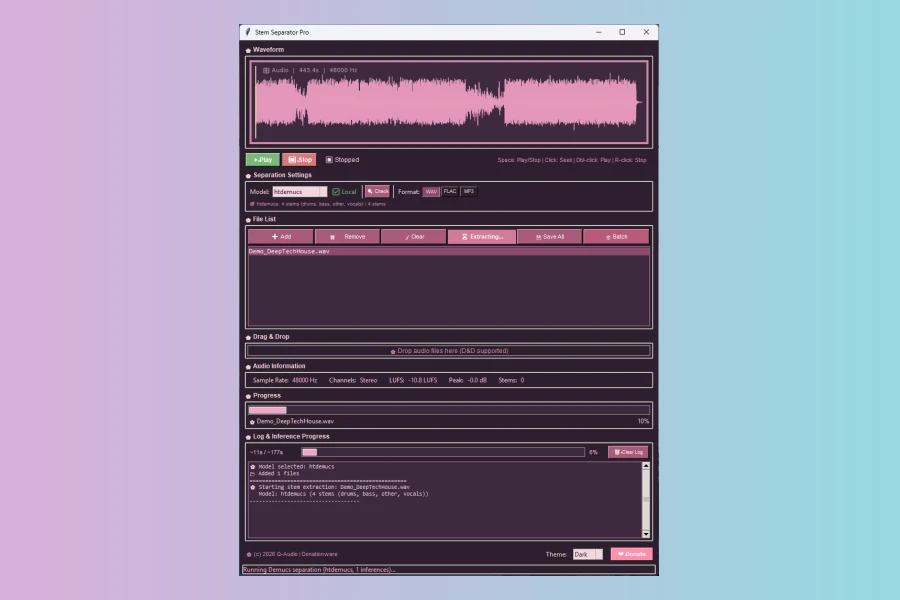
Stem Separator Pro offers many useful features. It includes an easy installation process. All models are bundled with the installer. A real-time waveform player shows yellow cursor tracking. Drag and drop support makes it simple to load files. Batch mode processes entire folders at once. A detailed log panel shows inference progress. The file list manages multiple audio files. Export options include WAV, FLAC, or MP3. A dark/light theme with pink accents is available. The status bar tracks progress in detail. Real-time pipeline logging helps troubleshooting. Keyboard and mouse shortcuts speed up workflow.
Features
- Powered by Meta AI’s Demucs engine
- Fully offline operation
- Batch processing of folders
- Export to WAV, FLAC, or MP3
- Real-time waveform player
- Drag & drop support
- Dark/light theme
Pricing and Availability
Stem Separator Pro is available for Windows. It is free and donationware. Users can download it without paying. Donations are optional if you find it useful. The application is ready to use after installation.
This tool stands out due to its offline nature. Many similar apps rely on cloud processing. That can be slow and insecure. Stem Separator Pro keeps everything local. It also supports batch processing. This saves time for large projects.
However, it is limited to Windows. Mac and Linux users cannot use it. The stem count is fixed at 4 or 6. Some alternatives offer more flexibility. Yet, for most tasks, this is sufficient.
Overall, Stem Separator Pro is a solid choice. It combines professional quality with ease of use. If you need reliable stem separation, it’s worth trying.
Pros
- Fully offline operation
- Powered by Meta AI's Demucs engine
- Batch processing support
Cons
- Windows only
- Limited to 4 or 6 stems
More info: Q-Audio | Stem Separator Pro
HIT OR SHIT Indicator
💩
Indication by Noizefield
Average Indication by Readers
🚀
What do you think?
Hit or Shit? Please rate from 1 (💩) to 10 (🚀)
✅ You already voted. Thanks!
Check these out!