AlterVerb 53: Free VST3 Reverb Offers Deep Spatial Control
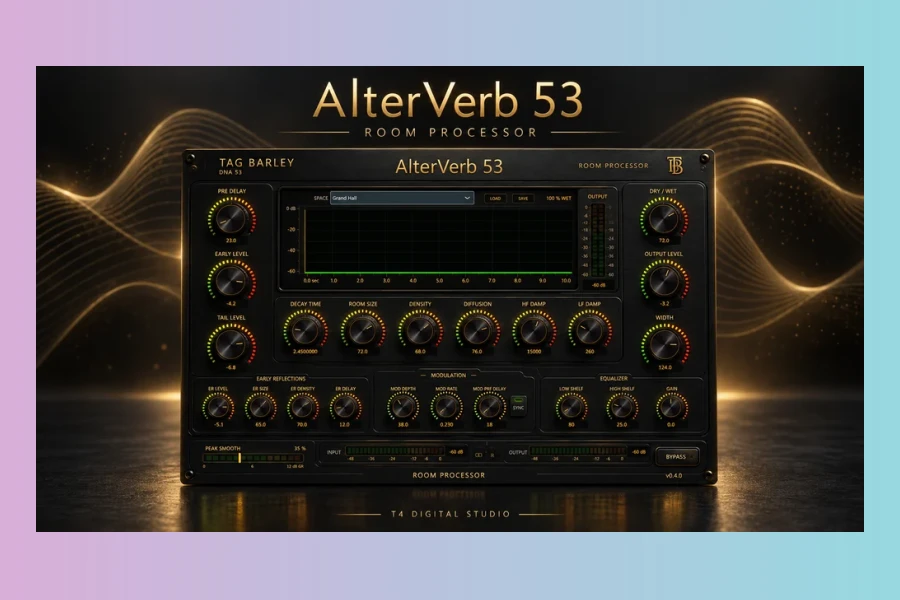
t4 Digital Studio has launched AlterVerb 53, a free VST3 reverb plugin for Windows. The release adds space, width, and depth to your mixes without sacrificing signal definition. Consequently, it aims at producers working with complex or layered sources where clarity is critical.
Flexible Reverb Tail Control
AlterVerb 53 gives you independent control over early reflections and the reverb tail. That means you can shape the initial response separately from the sustained decay. In addition, you’ll find parameters for room size, density, diffusion, damping, and modulation. These tools let you craft anything from tight acoustic spaces to broad ambient textures.
Features
- Independent early reflections and reverb tail controls
- Adjustable room size, density, diffusion, damping, and modulation
- Reverse-style onset for creative effects
- Preset loading and saving
- Resizable interface
- Dedicated Peak Smooth section to tame harsh high-frequency peaks
AlterVerb 53 also includes a unique Peak Smooth feature. It tames harsh high frequencies within the reverb tail. Meanwhile, it preserves the brightness and detail of the original signal. This makes the plugin particularly useful for bright or percussive material. Therefore, you can achieve polished results without dulling the overall mix.
As a result, the interface remains straightforward. All essential controls stay visible and accessible. Moreover, you can resize the window to match your workflow. That adds usability for both small laptops and large monitors.
Availability and Support
AlterVerb 53 is now available as a free download for Windows users. Naturally, it runs as a VST3 plugin inside your DAW. Furthermore, there is an optional pay-what-you-want donation. That way, you can support future development if you find the tool valuable. On top of that, there is no feature or time limitation in the free version.
Price
Free (optional pay-what-you-want support)
Whether you need a simple reverb for subtle spatial glue or a detailed tailoring tool, AlterVerb 53 delivers. Its combination of independent controls and peak smoothing makes it stand out. Nevertheless, it remains free. If you work on Windows, give it a try. It could be exactly what you need for complex productions.
Pros
- Independent control over early revisions and tail
- Dedicated Peak Smooth section preserves detail
- Resizable interface and preset management
Cons
- Windows only (VST3 format)
- No macOS or Linux versions available
More info: t4 Digital Studio | AlterVerb 53
HIT OR SHIT Indicator
💩
Indication by Noizefield
Average Indication by Readers
🚀
What do you think?
Hit or Shit? Please rate from 1 (💩) to 10 (🚀)
✅ You already voted. Thanks!
Check these out!