APC 1.5 Release is Here – Build Audio Plugins with AI, Easier Than Ever
If you have ever wanted to build your own audio plugin but felt like you need a computer science degree to get started – this is for you. The APC 1.5 release of Audio Plugin Coder (APC) just landed, and it brings the biggest changes since the project started. APC is the open-source framework that lets you describe a plugin in plain words – “warm tape delay with wow and flutter” – and have an AI coding assistant build the real thing: a VST3 plugin that runs in your DAW.
In this article I will explain, what changed in version 1.5 and why it matters if you are a musician, producer or hobbyist who wants to make their own plugins with AI – without drowning in C++ and configuration files.
Meet the APC Hub
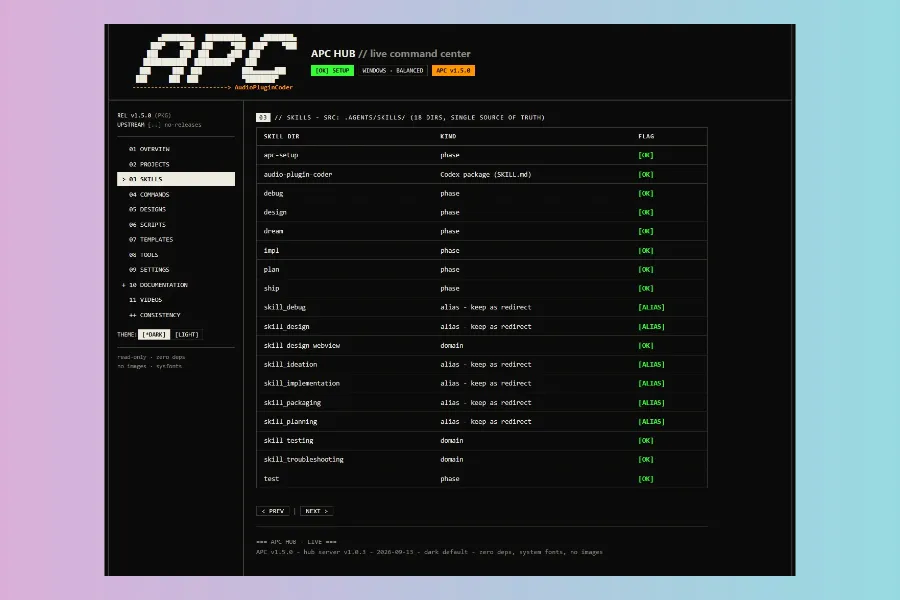
The star of the APC 1.5 release is the APC Hub – a live web dashboard that gives you a complete overview of your whole project in your browser. Think of it as the cockpit of your plugin workshop.
Instead of digging through folders and JSON files to find out where a plugin stands, you get everything at a glance:
- All your plugins – which one is finished, which one is half-built, and exactly what the next step is.
- The design library – your saved plugin looks and colour schemes, each with live previews you can open in a new tab.
- Scripts, templates and tools – everything the framework uses, listed and explained.
- Your settings – edit them with a simple form instead of hand-editing configuration files.
- The documentation center – all of the framework’s docs, searchable and readable right there.
The Hub is read-only by default, so nothing can break by accident. You start it with one command (/apc-hub in your assistant, or node hub/server.js) and it runs locally in your browser. No internet required, no account, no cloud. It is also the seed of something bigger: the plan is to grow the Hub into a full workbench where you can eventually build entire plugins from the browser.
More AI Assistants Welcome: Codex, Cursor and OpenCode
APC is “agent-agnostic” – it is designed to work with whatever AI coding assistant you already use. And in the APC 1.5 release, that list got much friendlier.
Codex is Now Fully On Board
Previously, OpenAI’s Codex could not use slash commands the way other assistants could – a real gap. Version 1.5 fixes that properly: Codex now gets a dedicated skill and plugin, so you can run any APC phase with $audio-plugin-coder:audio-plugin-coder <action>. There is also optional cost-aware model routing (the Luna, Terra, Sol and Astra tiers) that picks smarter or cheaper models automatically, so you do not burn your API budget while sketching ideas.
Cursor: Done and Dusted
Cursor was “mostly working” before – now it is ready out of the box. All the /apc-* commands, the custom rules, and the guidance in AGENTS.md are wired up for it. Open Cursor, clone the repo, run /apc-setup, and you are off.
OpenCode: Fully Wired
OpenCode joins the family too. Every APC command has a dedicated integration for it, exactly like Claude Code and Kilo. If that is your tool of choice, everything just works.
So whichever assistant you already use – Claude Code, Kilo, Cursor, Codex, OpenCode or Antigravity – APC meets you there.
One Command-Line Tool to Rule Them All
APC used to hand you a pile of PowerShell and Bash scripts, each for one job. Version 1.5 consolidates everything into one cross-platform command-line tool called apc:
apc version– which version are you onapc doctor– check your whole setup, and even fix common issues automaticallyapc build MyPlugin– compile your pluginapc validate– check webview, visage and plugin configurationapc backup/apc rollback– never lose workapc status– what state is your plugin in
The tool is tested by an automated suite of 23 tests, so you can trust it on Windows, macOS and Linux. And the framework version itself now has a single source of truth – one apc version sync command keeps everything aligned.
Improve Your Plugins After Release
Shipped your plugin? In the APC 1.5 release, you can keep evolving it cleanly:
/apc-patch– open a focused bugfix round on a finished plugin/apc-evolve– start a new feature upgrade
APC keeps track of your versions for you, so a “generation” of your plugin stays consistent – you know exactly what changed between releases, and your state files stay healthy.
What Else Got Better
- Cleaner releases – installers and zips now go to a tidy
release/folder that honours your configured paths. - Docs that match reality – 12 documentation files were rewritten to describe how the framework actually works today, including the JUCE 9 interop path, relocatable folders and the
/apc-*command names. - Foundation – APC stays on JUCE 9, the industry-standard audio framework behind countless commercial plugins.
Why It Matters for Musicians and Hobbyists
The whole point of Audio Plugin Coder is that you do not need to be a C++ engineer to build a plugin. You describe what you hear in your head – the AI spits out working, buildable code. The APC 1.5 release removes the last annoying friction points:
- You can now work in the assistant you already pay for and use every day.
- You can see – at a glance – exactly where every project stands.
- You can change settings without being afraid of breaking a JSON file.
- You can keep improving plugins after they are released, with versioning handled for you.
Try It Yourself
Getting started is free and open source:
npx github:Noizefield/audio-plugin-coderThen run /apc-setup and /apc-dream MyPlugin to dream up your first plugin.
If you prefer watching, there is also a growing video tutorial series that walks through the framework step by step.

Whether you are a lifelong musician, a bedroom producer, or just curious about what AI can build for your music – the new APC 1.5 release is the easiest door in yet. Go build something that makes sound.
More info here: GitHub | Noizefield – Audio Plugin Coder (APC).
HIT OR SHIT Indicator
💩
Indication by Noizefield
Average Indication by Readers
🚀
What do you think?
Hit or Shit? Please rate from 1 (💩) to 10 (🚀)
✅ You already voted. Thanks!
Check these out!