

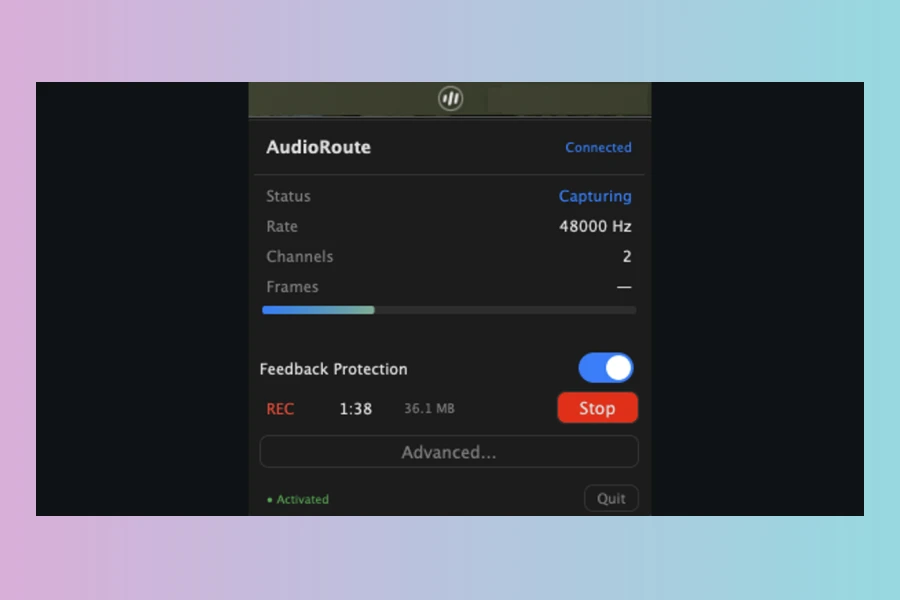
Arvital Soft has announced the release of AudioRoute version 0.2.0, a versatile tool designed for capturing system audio within various recording environments. This latest update introduces an Audio Effect plug-in variant, expanding its utility for music producers and content creators. AudioRoute aims to simplify the process of recording system audio, offering multiple pathways to integrate sounds from your computer directly into your workflow.
AudioRoute provides three distinct methods for audio capture, ensuring compatibility with a wide range of applications. Firstly, users can employ the AudioRoute Capture VST3/AU plugin directly within their Digital Audio Workstation (DAW) like Ableton Live, Logic Pro, FL Studio, or Reaper. This allows for seamless recording of system-wide audio onto any track, ideal for sampling, podcasts, or capturing reference material. Furthermore, the 0.2.0 update specifically adds an FX variant, which can be inserted onto any audio, aux, or FX track, complementing the original Instrument variant.
Versatile Capture Methods for Any Workflow
Secondly, AudioRoute functions as a virtual input device. By selecting “AudioRoute Input” as the recording source, applications such as Audacity, OBS Studio, Zoom, Discord, or QuickTime can capture system audio effortlessly. This eliminates the need for complex aggregate devices or manual output swapping, streamlining the recording process. It registers as a system-wide audio input, behaving much like a physical microphone.
Lastly, for quick and straightforward captures, AudioRoute offers a one-click direct-to-file recording via its menu bar app. This feature allows users to capture system audio directly into a clean WAV file at their chosen sample rate and bit depth, all without opening a DAW. Consequently, this provides flexibility for various use cases, from quick sound bites to longer recordings.
Precision and Seamless Integration
A key feature of AudioRoute is its commitment to bit-perfect audio capture. The software ensures that the recorded WAV file is byte-equivalent to the source audio, preventing any unwanted sample-rate or bit-depth conversions unless explicitly requested. This precision is crucial for maintaining audio fidelity, supporting rates from 44.1 kHz up to 192 kHz at 24-bit or 32-bit float. Moreover, the tool is designed for easy setup; a single installer deploys the plugin, virtual device, and capture daemon, requiring no post-installation configuration of audio routing or aggregate devices.
The latest 0.2.0 update brings several enhancements, including the aforementioned AudioRoute Capture FX variant. This allows users to pick the plugin type that best matches their track, whether an effect on an audio track or an instrument on a MIDI track. Other improvements since version 0.1.13 include reworked onboarding flows, bit-perfect system audio capture on Windows (pending Microsoft’s driver attestation review), and an auto-rate feature that follows the default output device automatically. In addition, AudioRoute includes built-in feedback protection to prevent accidental audio loops.
Features
- VST3/AU plugin for DAW integration (including new FX variant)
- Virtual input device for system-wide audio capture
- One-click direct-to-file recording via menu bar app
- Bit-perfect audio capture up to 192 kHz, 32-bit float
- Cross-platform support for macOS and Windows
- No aggregate devices or complex routing required
- Built-in feedback protection
- Automatic updates
- Light on resources with native Apple Silicon support
Price
€29 (one-time payment)
Includes lifetime updates and a 14-day free trial.
👍 Pros
- ✓ Offers three versatile methods for system audio capture (DAW plugin, virtual device, direct file).
- ✓ Ensures bit-perfect audio quality up to 192 kHz/32-bit float for high-fidelity recording.
- ✓ Streamlined setup and workflow, eliminating the need for complex aggregate devices.
- ✓ One-time payment includes lifetime updates across macOS and Windows.
- ✓ Low CPU usage and built-in feedback protection.
👎 Cons
- ✗ The virtual audio device for Windows is currently pending release, though planned as a free update.
- ✗ Specific routing steps for certain DAWs, like Logic Pro, may require initial guidance for optimal setup.
More info: Arvital Soft | AudioRoute
HIT OR SHIT Indicator
💩
Indication by Noizefield
Average Indication by Readers
🚀
What do you think?
Hit or Shit? Please rate from 1 (💩) to 10 (🚀)
✅ You already voted. Thanks!
Check these out!