
Calibra VST3: Open Headphone Calibration Plugin
Iteritas has introduced Calibra. This new VST3 plugin is meticulously designed for Windows and macOS. It aims to revolutionize headphone calibration and monitoring directly within your digital audio workstation. This innovative tool stands out due to its open correction-file workflow. It provides a flexible alternative to traditional closed headphone-profile systems. Consequently, users gain the ability to load their own custom TXT correction files. This allows for precise and personalized audio adjustments.
Flexible Correction Workflow
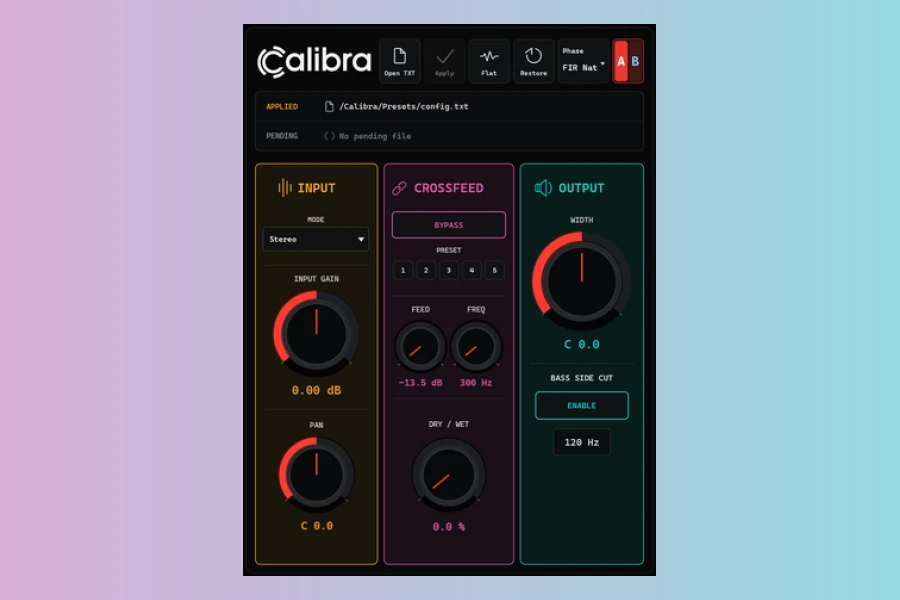
Calibra’s core strength lies in its support for various correction data types. For instance, it seamlessly integrates with Equalizer APO and AutoEQ-style files. It also works with measured or manually edited headphone correction data. This open approach ensures producers and engineers can apply their preferred correction curves. They are not restricted to pre-defined profiles. Moreover, the plugin supports FFP preset import and export. This facilitates the transfer of correction data between compatible workflows. In addition, Calibra includes multiple phase modes. These are IIR Minimum Phase, FIR Minimum Phase, FIR Natural Phase, and FIR Linear Phase. Each offers distinct tradeoffs in latency, phase behavior, and ringing characteristics. This variety allows users to select the optimal mode for specific monitoring tasks. These range from everyday mixing to critical mastering checks.
Advanced Monitoring and Comparison
Beyond calibration, Calibra incorporates a suite of practical monitoring tools. For example, it features A/B calibration slots. These enable direct comparison between different correction files, target curves, or even headphones. This functionality is invaluable for evaluating how various settings impact the audio. Furthermore, the plugin offers crossfeed capabilities. These mitigate extreme stereo separation often experienced with headphones. Thus, they create a more natural listening environment. Users can also utilize monitoring checks such as stereo width, pan, mono, Mid/Side, and Left/Right. These are crucial for ensuring mix translation across different playback systems. Project recall is another significant advantage. It saves the applied correction snapshot directly within your DAW project. This ensures consistency across sessions. Therefore, Calibra is an indispensable tool for those seeking meticulous control over their headphone monitoring environment.
Features
- Open correction-file workflow for custom headphone profiles.
- TXT support, including AutoEQ / Equalizer APO-style data.
- FFP preset import and export for data exchange.
- IIR and FIR correction modes (Minimum, Natural, Linear Phase).
- A/B calibration slots for comparing setups.
- Crossfeed and comprehensive monitoring tools (width, pan, Mid/Side, Left/Right).
- Project recall to save correction snapshots within DAW.
- Input gain, bass side cut, and safety protection for output levels.
Availability and Pricing
Calibra is currently available for Windows 10 or later and macOS 10.15 Catalina or later, supporting both Intel and Apple Silicon architectures as a VST3 plugin. The plugin is priced at $19.99 USD. Interested users can also download a free demo version, which offers full calibration and monitoring functionality, albeit with periodic short silences and disabled saving/exporting.
Pros
- Open correction-file workflow allows for highly customized headphone response.
- Multiple IIR/FIR phase modes offer flexibility for different latency and phase requirements.
- Comprehensive monitoring tools, including A/B comparison and crossfeed, enhance mixing accuracy.
Cons
- Requires users to source or create their own correction files, not an out-of-the-box solution with pre-made profiles.
- Initial online activation is required, which might be inconvenient for some offline setups.
More info: Iteritas | Calibra