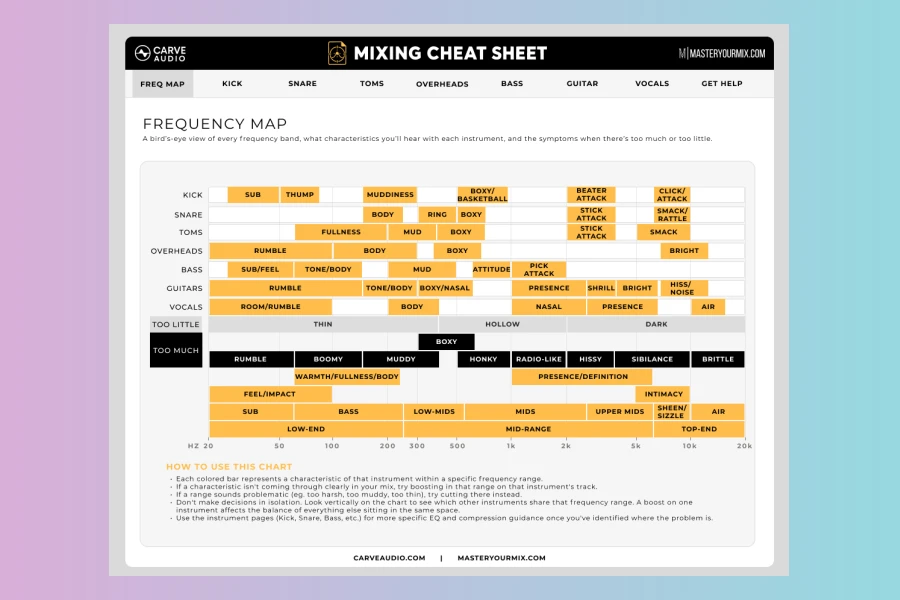
Carve Audio has released Mixing Cheat Sheet, a free plugin designed to help musicians understand what their mix actually needs. It is not another PDF or static chart. Instead, it lives inside your DAW and lets you hear frequency ranges in context. The plugin is available for macOS and Windows in VST3, AU, and AAX formats.
Why Mixing Cheat Sheet Was Created
Many home-studio musicians know something sounds wrong but cannot identify the problem. Traditional cheat sheets offer fixed rules. Those rules often fail because every song is different. Mixing Cheat Sheet focuses on decision-making instead of absolutes. It connects descriptive words like mud, body, fizz, bite, presence, and air to real sounds. Therefore, users can train their ears while they work.
Key Features
The plugin includes a Frequency Map that helps locate problem areas. You can solo any frequency range to hear what it is doing in the mix. This makes it easier to understand what needs attention. In addition, individual instrument pages provide EQ decisions, compression ideas, and mix tips for specific sources.Features
- Frequency Map for locating problem areas
- Solo any frequency range to hear it in context
- Connects descriptive mixing terms to real sounds
- Guidance adapts to the song instead of fixed settings
- Instrument pages with EQ, compression, and mix tips
- Runs inside the DAW as a plugin
- Completely free for macOS and Windows
Built for Real Mixing Decisions
Mixing Cheat Sheet does not tell you to always cut or boost a specific frequency. It helps you decide what works for the song in front of you. For instance, if a vocal sounds dull, the plugin can guide you toward the relevant frequency area. Consequently, you can make a more informed decision. Moreover, this approach builds confidence over time. It also keeps your workflow moving because you do not have to leave your session. However, it does not provide automatic fixes. As a result, you remain in control of every mixing move.
Who Should Use It
The plugin is aimed at home-studio musicians, indie producers, and growing mix engineers. It is especially useful for anyone who relies on guesswork with EQ and compression. Meanwhile, more experienced engineers may also appreciate the quick reference inside the DAW.
Price and Availability
Mixing Cheat Sheet is completely free. It can be downloaded from Carve Audio’s website. The plugin supports VST3, AU, and AAX formats on macOS and Windows.
Price
Free for macOS and Windows
👍 Pros
- ✓ Completely free DAW plugin
- ✓ Frequency Map with soloable frequency ranges
- ✓ Instrument pages with EQ, compression, and mix tips
👎 Cons
- ✗ Does not provide automatic mixing fixes or presets
- ✗ Limited to educational guidance without metering or analysis tools
More info: Carve Audio | Mixing Cheat Sheet
HIT OR SHIT Indicator
💩
Indication by Noizefield
Average Indication by Readers
🚀
What do you think?
Hit or Shit? Please rate from 1 (💩) to 10 (🚀)
✅ You already voted. Thanks!
Check these out!