
Ninja AB: Section-Synced A/B Referencing Plugin
The Him DSP, a new venture from acclaimed EDM DJ and producer The Him, has officially launched Ninja AB, a master A/B referencing plugin designed to refine the mixing and mastering process. This innovative tool aims to provide producers, mixers, and mastering engineers with a more insightful approach to comparing their tracks against professional references. Ultimately, it helps users make more informed decisions about their audio.
Developed by The Him himself, who boasts over half a billion Spotify streams and official remixes for top artists like Tiësto and Martin Garrix, Ninja AB emerges from a workflow he has personally utilized for years. The plugin transforms a previously “hacky” referencing method into a streamlined, feature-rich solution. Consequently, it offers advanced visualizations and functionalities that were not available in his earlier personal setup.
Revolutionizing Referencing Workflow
A core innovation of Ninja AB is its unique section tagging and synchronization capability. This feature allows users to compare specific parts of their track—such as a chorus, drop, or breakdown—directly against the corresponding section in a reference track. This eliminates the need for manual cue point adjustments, which can often be time-consuming and disruptive to the creative flow. Therefore, tagging references is a one-time process; the metadata is saved with the audio file, making future comparisons effortless.
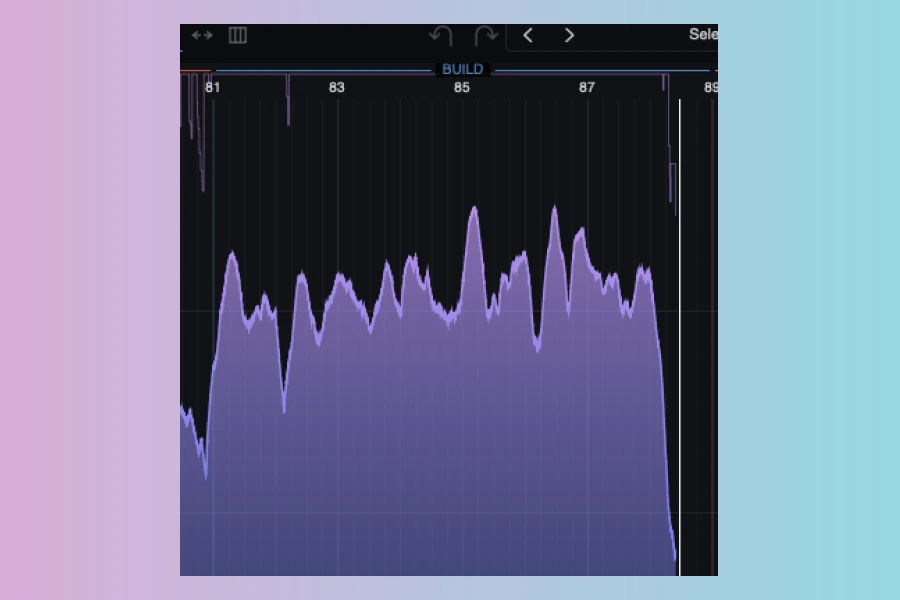
Moreover, Ninja AB introduces a “Live Capture” function. This capability enables the plugin to capture and display the project’s audio in real-time, offering detailed waveform, RMS, and PSR (compression) overviews. Users can scroll and zoom through their entire project timeline, mirroring how finished reference tracks are visualized. This consistent visual representation of both the project and references provides a clear perspective on dynamics and loudness.
Comprehensive Visual and Auditory Analysis
Beyond its innovative syncing, Ninja AB provides a suite of visual and auditory analysis tools. The plugin includes various metering options, such as RMS, K-12, K-14, K-20, VU, and peak metering, giving a comprehensive view of a track’s loudness and dynamics. Furthermore, multiband views offer insights into the frequency spectrum, helping users understand how different elements contribute to the overall sound.
Another significant advantage is the automatic LUFS level matching for all reference tracks. This ensures that comparisons are always fair and unbiased, preventing the common pitfall where a louder reference might inherently sound “better.” Users can also manually nudge reference levels for fine-tuning. Additionally, an auditioning panel provides high/low-pass band filters and stereo monitoring options (L, R, Mid, Sides). This allows for detailed listening and analysis of specific frequency ranges or stereo components. The combination of these features makes Ninja AB a robust tool for critical listening and decision-making during production.
Features
- Live project capture: see your master like a reference
- Tag your sections once, saved with your files
- Section-synced referencing: chorus to chorus, drop to drop
- Multiple link modes: section, BPM, and project sync (compare alt mixes)
- Multiband, RMS, and waveform overviews
- RMS, K-12, K-14, K-20, VU, and peak metering
- Automatic LUFS level matching for references
- Manual per-reference level nudging
- Auditioning panel with high/low-pass band filters
- Stereo monitoring: L, R, Mid, and Sides
- Zoom from a single bar to the whole arrangement
- 9 reference slots in the bottom shelf
- macOS (Intel / Apple Silicon) and Windows 64-bit
- VST3, AU, AAX

Price
Full License: 79.00 € (incl. taxes)
Ninja AB is available for macOS (Intel / Apple Silicon) and Windows 64-bit, supporting VST3, AU, and AAX plugin formats. A 14-day free trial is also offered, allowing users to experience its capabilities before committing to a purchase. This allows producers to integrate a professional-grade referencing tool into their workflow.
Pros
- Unique section tagging and synchronization for precise A/B comparisons.
- Comprehensive visual overviews (waveform, RMS, multiband) for detailed analysis.
- Live project capture allows for consistent comparison with reference tracks.
- Automatic LUFS level matching ensures fair and unbiased comparisons.
- Integrated auditioning panel with band filters and stereo monitoring.
Cons
- Specific workflow might require adjustment for users accustomed to traditional referencing methods.
- Focuses solely on A/B referencing, requiring other tools for comprehensive mastering.
More info: The Him DSP | Ninja AB