
SATK Overdub Studio: Voice-Over DAW for Video
SATK, a Germany-based audio software studio, has introduced Overdub Studio, a new digital audio workstation specifically engineered for voice-over production. This standalone application, available for both macOS and iPad, targets professionals who need to quickly and efficiently add broadcast-grade voice-overs to video pieces, news inserts, and sports highlights. The core philosophy behind Overdub Studio is to simplify the entire process, allowing users to achieve professional results without requiring extensive technical knowledge or a dedicated sound engineer.
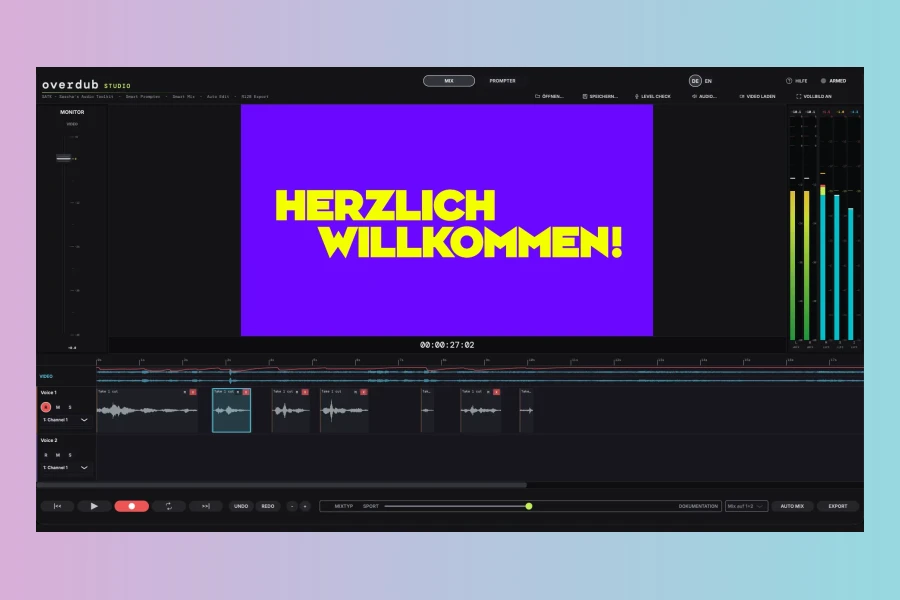
The workflow is intentionally streamlined, aiming to reduce complexity and accelerate production. Users can load a video, record their voice-over, and export the finished product with minimal intervention. For instance, the software automatically removes pauses during recording through its Auto Edit feature, enabling a more natural and fluid recording experience. Should a speaker make a mistake, they can simply re-record the segment, and the application seamlessly integrates the correction. Furthermore, the Auto Audio function automatically optimizes the voice signal for clarity and broadcast loudness, ensuring that the final output meets professional standards without manual adjustments. This automation significantly reduces the time spent on post-production tasks.
Streamlined Workflow and Intelligent Automation
Overdub Studio distinguishes itself through its array of intelligent automation features designed to simplify the voice-over process. The Auto Mix feature, for example, allows users to balance voice, background music, and sound effects with a single click. This ensures that all audio elements are perfectly blended and set to broadcast-ready loudness levels, eliminating the need for complex mixing. Moreover, the application maintains the integrity of MXF source files throughout the entire import and export process, ensuring a complete round-trip and consistent timecode synchronization. This is particularly beneficial for broadcast environments where media asset management and file consistency are crucial.
Another notable feature, especially for the macOS version, is the Smart Prompter. This integrated tool scrolls the text synchronously with the speaker’s voice, thereby maintaining a steady reading position. Consequently, voice artists can concentrate fully on their delivery and content, rather than manually navigating through the script. This feature emulates a professional studio environment, making the recording process smoother and more efficient. The iPad app, however, focuses more on the mix workflow and does not include the Smart Prompter functionality, which is a key distinction between the two versions.
Key Features and Technical Specifications
Overdub Studio is built on native C++ and JUCE 8, ensuring robust performance and stability. It operates locally, meaning no cloud synchronization or streaming is required, which enhances data security and workflow reliability. The application supports various video formats, including MP4, MOV, MXF, and WebM, making it versatile for different production pipelines. For export, users have options like WAV, Stems, and direct video multiplexing, allowing for flexible integration into existing workflows.
Features
- Auto Edit: Automatic pause removal and error correction during recording.
- Auto Audio: Automatic voice optimization for clarity and broadcast loudness.
- Auto Mix: One-click balancing of voice, music, and effects to broadcast levels.
- Smart Prompter: Text scrolls with voice, maintaining reading position (macOS only).
- Video Integration: Direct import/export of MP4, MOV, MXF, WebM with timecode sync.
- Recording: Features pre-roll, clear level display, and direct monitoring for studio-like takes.
- Standards & DSP: Adheres to Loudness ITU-R BS.1770-4 and EBU R128, includes SmartDenoiser, AutoEQ, AutoComp, SmartLeveler, and SmartDucker.
- Platform: Supports macOS 13+ (Universal Binary for Apple Silicon + Intel x86_64) and iPadOS 16+ (without Prompter).
- Export: Offers WAV, Stems, and Video-Mux options.
Price
macOS Standalone: 199.00 € (one-time purchase)
iPad App: Monthly subscription
This specialized tool is designed to be installed once and immediately put to use, providing a focused solution for rapid, professional voice-over work in demanding editorial environments. It joins SATK’s existing suite of broadcast and post-production tools, including SATK Broadcast Meter and SATK Loudness Correct, further solidifying the company’s commitment to audio professionals.
Pros
- Highly automated workflow simplifies professional voice-over production for video.
- Integrated broadcast-grade audio processing ensures high-quality output without manual mixing.
- Smart Prompter (macOS) and seamless video integration enhance recording efficiency and post-production.
Cons
- Smart Prompter is exclusive to macOS, limiting the iPad app’s functionality for script reading.
- Specialized focus means it lacks the versatility of a general-purpose DAW for broader audio tasks.
- iPad version utilizes a subscription model, which may not suit all users.
More info: SATK | Overdub Studio