
Steinberg SpectraLayers 13: Unmixing, Voice Separation
Steinberg has officially released SpectraLayers 13, a significant update to its spectral editing and unmixing application. This new version introduces a suite of powerful tools designed to enhance audio repair, sound design, and post-production workflows. Furthermore, it focuses on isolating specific audio elements from complex recordings, offering greater precision and efficiency to audio engineers and producers.
Enhanced Sound Unmixing and Ambience Repair
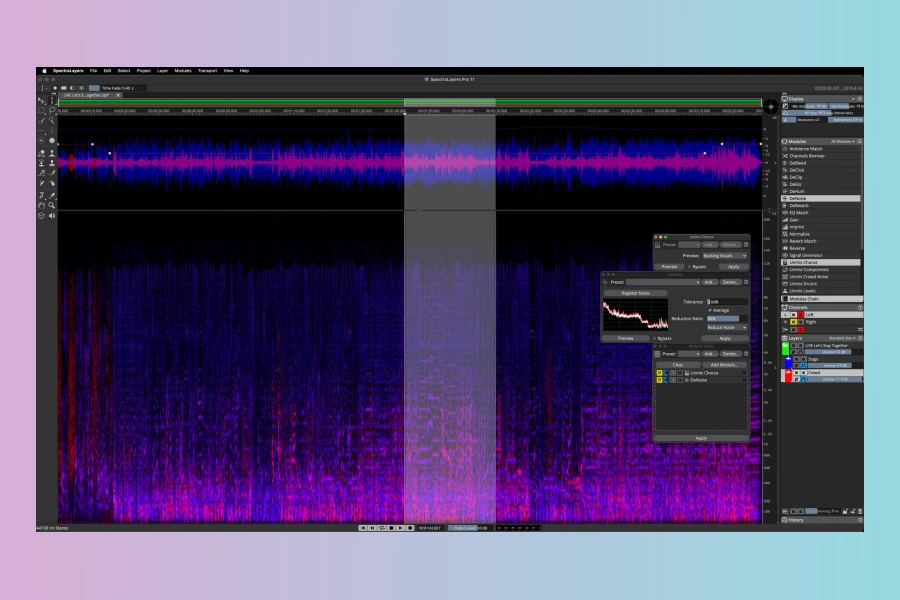
The headline addition in SpectraLayers 13 is Unmix Sound Effects. This innovative process enables users to separate short, distinct sounds from continuous background noise, such as wind, crowd chatter, or traffic. Importantly, it preserves the ambient background texture on its own layer, allowing for detailed manipulation. In addition, the new Ambience Heal process complements this by automatically filling any spectral gaps created during unmix or cut operations. For instance, if a voice is removed from a track, Ambience Heal intelligently uses existing room tone to seamlessly fill the resulting space, ensuring a natural-sounding repair.
Advanced Voice Separation and Dialogue Editing
Voice processing receives three substantial additions in this release. Firstly, Unmix Two Voices can automatically separate two speakers without requiring prior voice profile registration, streamlining workflow considerably. Moreover, Voice DeCrosstalk provides the ability to isolate a non-target voice, whether in the background or foreground, from the primary speaker, even when voices overlap. Lastly, Voice DeClick effectively removes common mouth noises like lip smacks and tongue clicks. Consequently, these tools significantly extend SpectraLayers’ existing dialogue editing capabilities, addressing common cleanup tasks previously performed manually by post-production engineers.
Spectral Reconstruction and Workflow Improvements
SpectraLayers 13 also introduces a new Reconstruct module, which handles spectral data resynthesis. This module utilizes before/after selections to reconstruct tones and above/below selections to reconstruct transients and noise, with configurable reconstruction amounts for each component. Furthermore, paste operations have been expanded with Paste Into Selection for repeating or replacing timeline events and a Paste Insert tool. Time Fade and Frequency Fade sliders are now applicable to active selections, offering greater flexibility. The software can now calculate and display loudness data, including True Peak and multiple LU measurements, across spectral selections or layer combinations, with automatic updates. Batch processing now runs across multiple open projects simultaneously. Additionally, the Pro Tools AudioSuite Bridge plug-in now supports round-trip editing of multiple audio clips in a single pass, including Dolby Atmos up to 9.1.6 and Ambisonics formats. Workflow changes also include adjustable time and frequency coordinates via a new corner-based handle, relative amplitude attenuation within selections, and saveable UI layouts. Over 100 functions can now be assigned keyboard shortcuts, and audio device support has been extended beyond 128 channels. The Unmix Transcription module also exports to more frame rates, and improved tooltips provide function and shortcut information upon hovering.
Features
- Unmix Sound Effects: Separates short sounds from continuous ambient/background audio, preserving the background layer.
- Ambience Heal: Automatically fills spectral gaps left by unmix or cut-to operations using existing room tone.
- Unmix Two Voices: Separates two speakers without voice profile registration.
- Voice DeCrosstalk: Isolates overlapping background or foreground voices from the primary voice.
- Voice DeClick: Removes mouth noise such as lip smacks and tongue clicks.
- Reconstruct module: Resynthesizes tones, transients, and noise from before/after and above/below selections.
- Paste Into Selection and Paste Insert tools for enhanced editing.
- Time Fade and Frequency Fade sliders usable on active selections.
- Automatically updating loudness metering (True Peak, multiple LU measurements) on selections and layer combinations.
- Batch processing across multiple open projects simultaneously.
- Pro Tools AudioSuite Bridge: Round-trip editing of multiple clips, Dolby Atmos (up to 9.1.6) and Ambisonics support.
- Corner-based handle for simultaneous time/frequency selection adjustment.
- Saveable and recallable UI layouts.
- Assignable keyboard shortcuts for over 100 functions.
- Audio device support beyond 128 channels.
- Additional export frame rates for the Unmix Transcription module.

Price
SpectraLayers Pro 13: $359.99
SpectraLayers Elements 13: $89.99
Pros
- Advanced sound effect unmixing and ambience healing capabilities.
- Comprehensive suite of voice separation and dialogue cleanup tools.
- New spectral data reconstruction for tones, transients, and noise.
Cons
- The advanced nature of spectral editing may present a learning curve for new users.
- Some specialized features like the Pro Tools AudioSuite Bridge are platform-specific.
More info: Steinberg | SpectraLayers 13