Audacity 4: Redesigned Clip Workflow, New Tools, Free
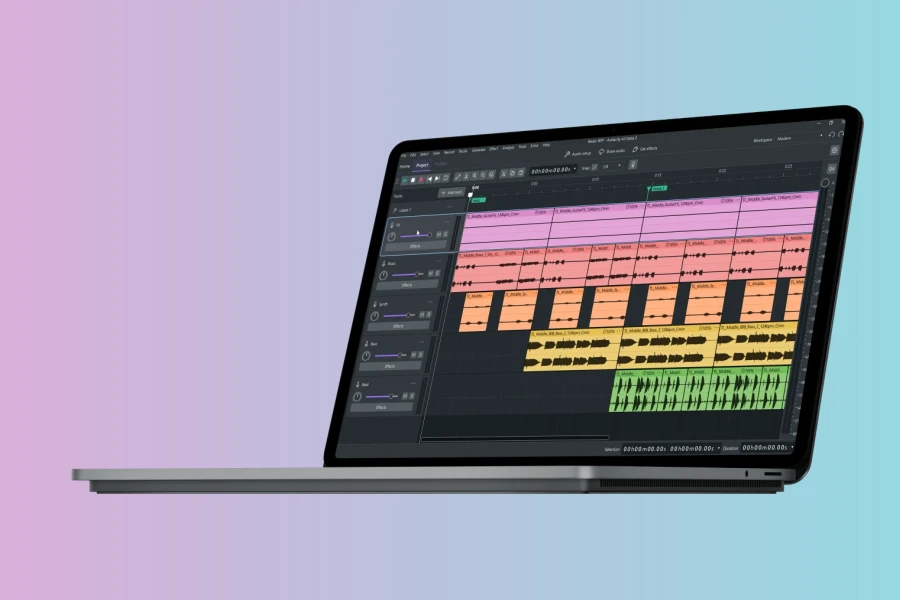
Muse Group has officially released Audacity 4, a major update to the popular open-source audio editor. This version introduces a redesigned clip editing workflow, new tools, and a refreshed interface. Audacity remains free and open source, continuing its 25-year legacy.
Redesigned Clip Editing Workflow
The core of Audacity 4 is its new clip editing system. Clips can now overlap, and multiple clips can be selected and edited together. Related clips can be grouped and moved as a single object. Editing is fully non-destructive, so users can recover trimmed audio by extending a clip. Ripple editing options provide flexibility for project arrangements.
New and Updated Tools
A dedicated Split tool makes it faster to divide recordings at the playhead across multiple tracks. Clip envelopes allow volume automation directly within clips, enabling fades without altering the original recording. Built-in effects have been redesigned with updated interfaces, while retaining functionality. Support for VST3, Audio Unit, and LV2 plug-ins continues.
Enhanced Project Organization
Audacity 4 introduces a home screen for accessing local and cloud projects stored on audio.com. Projects appear as visual thumbnails, making browsing easier. The Workspaces feature lets users create custom interface layouts for different tasks, such as podcasting or music production. This simplifies switching between workflows.
Visual Redesign and UI Updates
The toolbar and track controls have been reorganized. Playback and recording meters are updated, and an always-visible playhead improves navigation. Light and dark themes, customizable accent colors, and an improved high-contrast mode are included. The overall interface feels modern while preserving the familiar layout.
Availability and Future
Audacity 4 is available for download at audacityteam.org or via MuseHub. It remains free and open source, with contributions from the community. This update lays groundwork for future intelligent tools and connected workflows. Existing users can upgrade without losing project compatibility.
Pros
- Redesigned clip editing with non-destructive and ripple options
- New Split tool and clip envelopes for advanced automation
- Home screen and workspaces improve project organization
Cons
- Major redesign may require adjustment for existing users
- Cloud project features require an audio.com account

More info: Muse Group | Audacity 4
HIT OR SHIT Indicator
💩
Indication by Noizefield
Average Indication by Readers
🚀
What do you think?
Hit or Shit? Please rate from 1 (💩) to 10 (🚀)
✅ You already voted. Thanks!
Check these out!